METATRADER 5 · CURRENT BUILD

Capital Vector Trade Assistant V11

The verified compiled Expert Advisor build for connecting Capital Vector automated trading to your MT5 terminal.

Download advisor .EX5Ready to install
V11CAPITAL VECTOR EA
Version
11.0
Updated
30.09.2026
Compilation
0 errors · 0 warnings
Size
813 KB
MT5AUTO: OFF
QUICK GUIDE

V11 setup in plain language

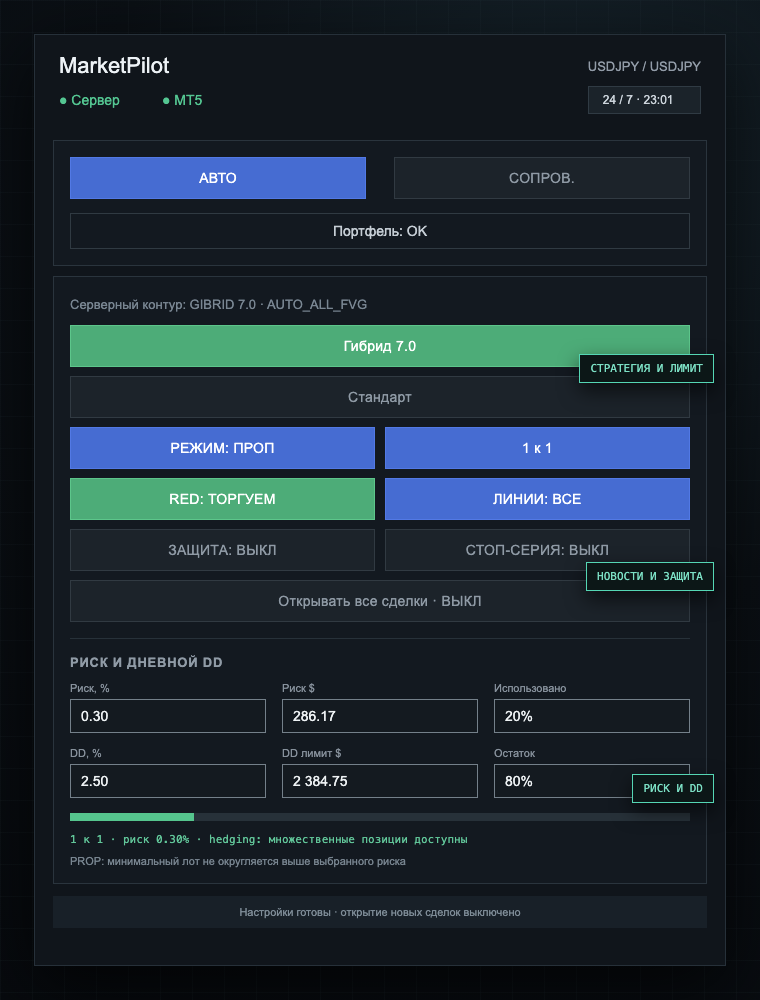
The panel below is reproduced directly from the current advisor code. Clicking a control cycles through its available modes.

Capital Vector V11 automated trading panel
Capital Vector V11 · AUTO
1

Choose AUTO

The advisor receives signals and may open trades.

2

Set the modes

Choose strategy, trading limit, Take and news rules.

3

Set risk

Check per-trade risk and daily DD.

4

Enable entries

Only then enable opening trades for this asset.
Main modes

Main modes

AUTO / MANAGE

AUTO opens permitted trades. MANAGE only assists an existing position.

Hybrid 7.0

7.0 → 5.0 → 2.0 → ULTRA → back to 7.0.

Standard / One / Multiple

Concurrent positions and the +1R…+5R daily target are selected independently.

MODE: PROP

PROP enforces daily DD. DEPOSIT is for a personal account.

1 to 1

Take 1R, 0.8R or 0.5R.

Protection and execution

Protection and execution

FVG: TRADE / DO NOT TRADE

Switches the established target-FVG requirement. The experimental H1-protection mode was removed.

LINES

Hidden → target-FVG boundary only → all lines.

STOP STREAK

Off → stop after 1, 2, 3, 4 or 5 consecutive stops.

SCHEDULE: ON / OFF

Applies the local session and pauses configured next to the token. Outside it only new entries are blocked.

Open every trade

Master safety switch. Off by default for every asset.

Reset daily target

Allows trading to resume after the selected daily target is reached.

Risk and daily DD

Risk, %

Share of the account per trade.

Risk $

The same risk in money.

DD

Maximum daily drawdown.

Used

Consumed share of the daily limit.

RELEASE NOTES

What's new — 30.09.2026

  • ✓Updated compatibility with the current frozen ULTRA champion contracts and protective LIMIT entries for GOLD, GBPUSD and UK100.
  • ✓The SCHEDULE button replaces RED and is off by default.
  • ✓The main trading session and two optional pauses are configured next to the token.
  • ✓Schedule and pause settings use clickable true/false selectors.
  • ✓Times follow the user's computer clock and overnight intervals are supported.
  • ✓Outside the schedule only new entries are blocked; open trades continue to be managed.
INSTALLATION

How to install

  1. 01Download the advisor file above.
  2. 02In MT5 open File → Open Data Folder → MQL5 → Experts.
  3. 03Place the .ex5 file there and refresh Expert Advisors or restart the terminal.
  4. 04Allow WebRequest for the Capital Vector server address and enter your issued token.
  5. 05Configure mode, risk and assets, then explicitly enable trade opening.
SHA-256 checksumUse this to verify that your download matches the tested build.
1ea7591fb0c4541edee1766043c53d863266c3a11603162025d5fe6a2895068a